GEPRC DarkStar 22 Mods (GPS w/compass & Buzzer)

Adding GPS and a Buzzer to the Darkstar 22
The GEPRC Darkstar 22 is an incredibly capable micro cinewhoop right out of the box. But if you're flying in open areas or anywhere you might lose line of sight, adding GPS and a buzzer is cheap insurance. Here's how I modded mine.
The Flight Controller: GEPRC TAKER F405 20A AIO
The Darkstar 22 comes equipped with the GEPRC TAKER F405 20A ELRS2.4 2-4S AIO flight controller. It's a compact all-in-one board with the ESCs built in, which keeps the stack slim on this micro build.
The good news for modders: GEPRC left open pads RX and TX pads for a GPS, SDA and SCL pads for a compass, and a BZ- for a buzzer.
Why Add GPS?
GPS unlocks features like Return to Home, GPS Rescue, and position hold. On a quad this small, losing it in tall grass or over water is a real risk. GPS Rescue has saved more than a few quads from ending up in trees or disappearing forever after a failsafe.
The compass addition also improves GPS accuracy and heading information, which makes autonomous features more reliable.
The GPS: Flywoo GOKU GM10 Mini V3
I went with the Flywoo GOKU GM10 Mini V3 GPS with Compass. It's an 18x18mm mounting pattern, lightweight, and has a built-in compass. Perfect for a micro build where every gram counts.
Custom 3D Printed Mount
There's not a lot of real estate on the Darkstar 22, so I designed a custom mount that fits an 18x18mm GPS module. The stock mounting area is designed for a smaller 15x15mm mini GPS, but this mount stuffs the larger GPS with compass into that same space. The tolerances are tight, but it works. The mount keeps the GPS elevated and away from electrical interference while staying compact.
Download the mount on Printables and print it in PETG for durability.
GPS Wiring
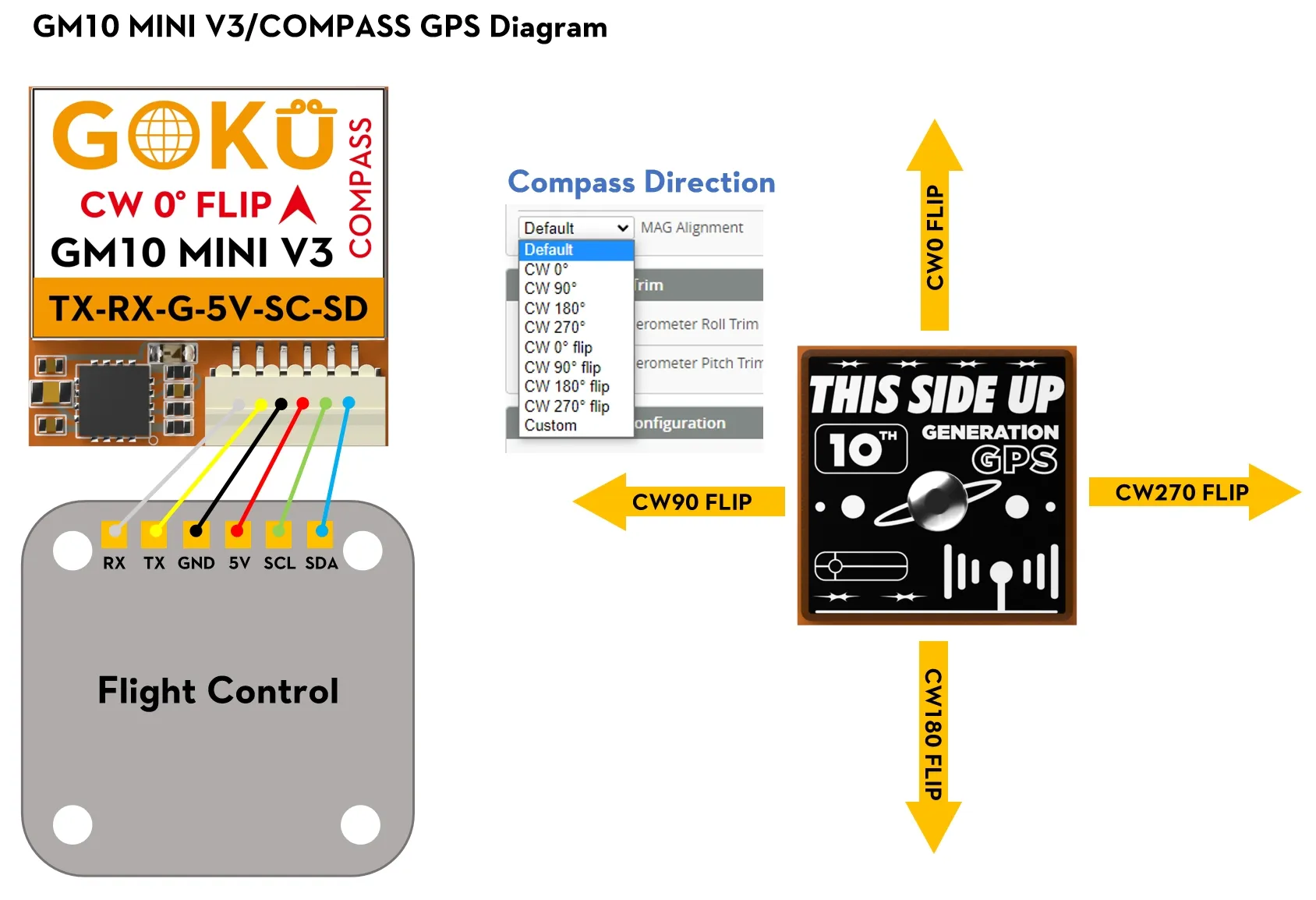
Wiring is straightforward. The TAKER F405 has a dedicated UART with pads labeled for GPS. Connect power, ground, TX, and RX.
GPS Wire | Flight Controller |
|---|---|
VCC | 5V |
GND | GND |
TX | UART RX |
RX | UART TX |
Make sure to configure the UART in Betaflight and enable GPS under the Configuration tab. If you're using the compass, you'll also need to enable the magnetometer (MAG) in Betaflight. The correct orientation is CW 0° Flip
Why Add a Buzzer?
A buzzer is the simplest mod you can do, and it might be the one that saves your quad. When you're down in grass or brush, the GPS coordinates get you close, but the buzzer gets you the rest of the way. It's loud, annoying, and exactly what you need when you're searching for a downed quad.
Buzzer Wiring
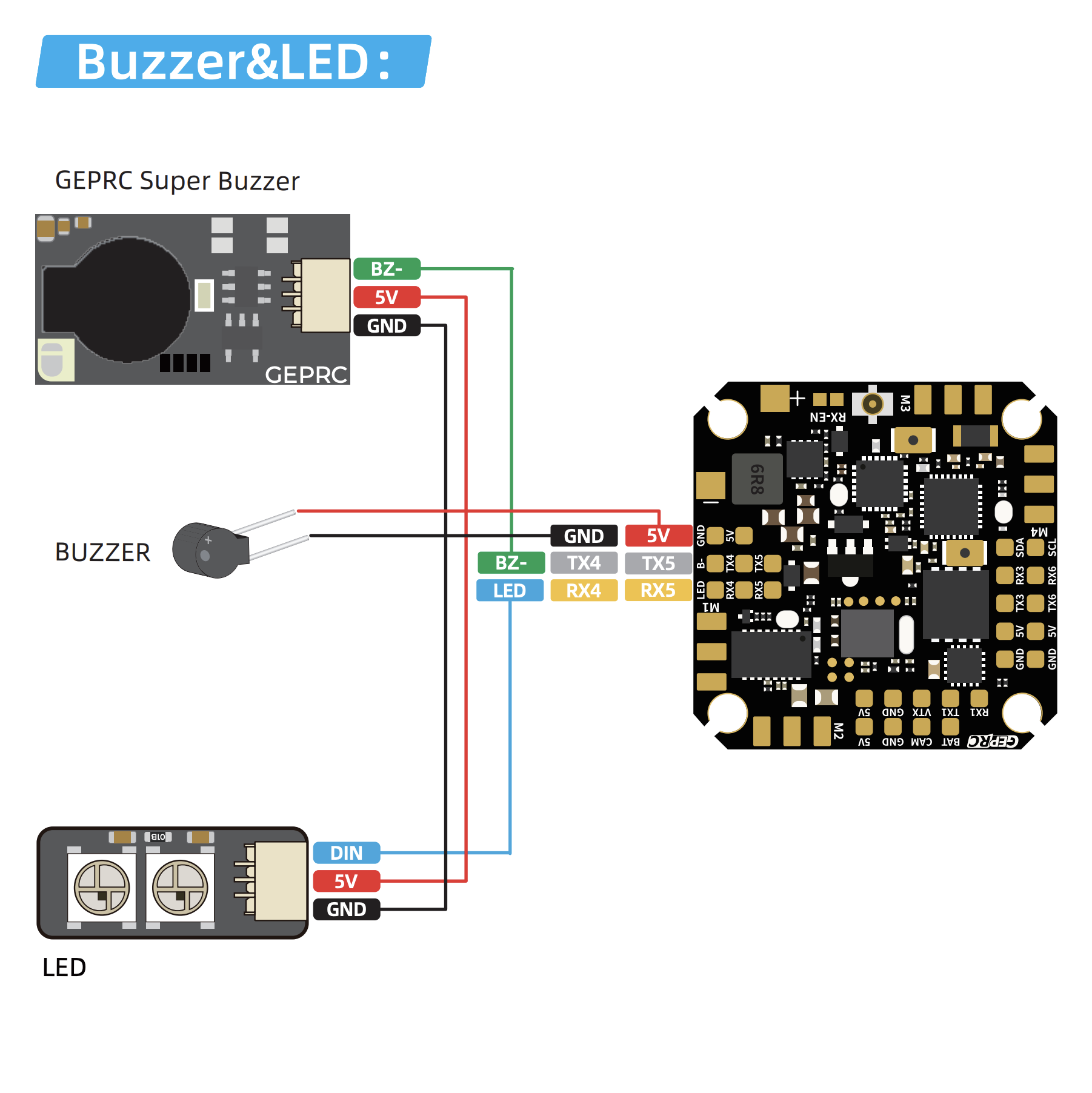
The TAKER F405 has dedicated buzzer pads clearly marked on the board. The buzzer connects directly to these, no hunting for spare pads or creative wiring needed. Polarity matters, so make sure positive goes to positive.
Buzzer Wire | Flight Controller |
|---|---|
+ (Red) | 5v |
- (Black) | BZ- |
Enable the buzzer in Betaflight under the Configuration tab and set up a switch in Modes to trigger it manually.
Final Thoughts
GEPRC made these mods easy by leaving the pads open on the TAKER F405. A little soldering, a 3D printed mount, and you've got GPS Rescue and a buzzer on a micro cinewhoop. These two additions add minimal weight but massively increase your chances of bringing the Darkstar 22 home after a rough flight.
Downloads & Parts


Available in the Shop
We sell a pre-printed DarkStar 22 Flywoo Mini GPS Mount in our shop if you don't have a 3D printer.
Related Blog Posts
GEPRC Woopower W63 Firmware Update
Having issues discharging batteries that are full? Well there is a firmware update that fixes that.
GEPRC Cinelog 30 v3 Custom Build
Explore our custom-built Cinelog 30 V3 setup, designed for smooth cinematic FPV flights. We break down the components, upgrades, and tweaks that make this build lightweight, durable, and perfect for capturing stunning aerial footage.